Hasselblad Flextight X5 vs. Noritsu HS-1800: Is the 39MP Virtual Drum Scan Worth It?

Venice on the Hasselblad Flextight - Expired Ektachrome 400
The Hasselblad Flextight X5. Most of us only know this machine from YouTube videos and film photography lore. Many photographers ask: Is Flextight better than Noritsu for medium format? Its promises? Legendary resolution and breathtaking colors. Many photographers ask: Is Flextight better than Noritsu for medium format? So, when my trusted lab, Urban Film Lab, announced they added one of these to their arsenal, I knew I had to put it to the test. And what better way to judge its performance than a head-to-head fight? Let me tell you, i was very excited when i got the WeTransfer link for the files.
We’ll test the Hasselblad Flextight X5 against the Noritsu HS-1800 for medium format film scanning, focusing on resolution, color, and real-world results
Quick Answer: Hasselblad Flextight X5 vs. Noritsu HS-1800 The Hasselblad Flextight X5 is the superior choice for professional archival and gallery prints, offering 39MP resolution, a massive 4.9 Dmax, and 16-bit color depth. However, for social media and standard prints, the Noritsu HS-1800 remains the industry standard due to its speed, excellent highlight recovery, and cost-effectiveness.
My Setup: Expired Ektachrome 400 on the Mamiya 645
Before we get into the technical scanner details, you might wonder why I’m doing this (or not). The reason is simple: I’m currently working on a book project about Venice, all shot on expired Ektachrome (what a surprise - if you love expired slide film, you might enjoy this blog), and for selected 6x4,5 slides i wanted to have the option to print them super large. I shot them on my Mamiya 645 with the 80mm f/2.8 lens.
I had two of my favorite Venice positives scanned on the Hasselblad Flextight X5. And, let’s be honest—part of it was just pure curiosity! Since I was already doing the test for my own work, I figured: why not share the experience with you?
What is a Virtual Drum Scanner? (Hasselblad Flextight X5 vs. Flatbed)
Most scanners pull your film through rollers, which is fast but can lead to slight flatness issues. The Hasselblad Flextight X5 is different. It’s a "Virtual Drum" scanner—it magnetically pulls the negative (or positive) into a slight curve, ensuring it stays perfectly flat and equidistant from the lens, without a glass in between. It can scan also pretty much everything. From 35mm, to Medium Format and 4×5.
The Flextight X5 doesn't just rely on its magnetic virtual drum; it uses world-class Rodenstock lenses and a 3x8000 linear CCD. Using Hasselblad’s proprietary FlexColor software, it captures a raw-like 3F file that preserves every highlight detail.
Noritsu HS-1800 Review: Why it's still the Standard for Pro Lab Scans
The Noritsu HS-1800 is the industry standard for a reason, but not because it delivers a "finished" look out of the box. Its real strength is how neutral and flat the files are. It preserves a good amount of information in the highlights and shadows, giving you a lot of post-processing headroom. And to be honest, I have always been more than happy with its results.
While the Noritsu HS-1800 is a CCD-based scanner as well, it excels in productivity. It features highly effective Digital ICE (Infrared Clean) for C-41 color negative film, which the Flextight lacks in its high-end optics path to ensure maximum sharpness.
But how does this professional scanner compare when we throw a machine into the ring that costs as much as a mid-sized car?
A Quick Heads-Up: I’m a photographer, not a scanning technician or a color scientist. This comparison is based on my personal workflow and what I see with my own eyes. I’m sharing my experience with these scans to help you decide which service fits your project. If you want to dive deep into the hardcore technical specs of virtual drum scanning, I highly recommend checking out these resources.
Flextight X5 Technical Specs: Resolution, DPI, and Dmax 4.9 Explained
| Feature | Hasselblad Flextight X5 | Noritsu HS-1800 |
|---|---|---|
| Scanning Principle | Virtual Drum (Magnetic Curve) | Roller Transport (Flat) |
| Optical Resolution (120) | 3200 DPI | ~2400 - 3000 DPI |
| Effective Pixels (6x4.5) | 7311 x 5321 px | ~4800 x 3500 px |
| Total Megapixels | ~38.9 MP | ~16.8 MP |
| Color Depth | 16-bit tiff | 16-bit tiff 8-bit jpeg |
| Color Space | Adobe RGB (1998) | sRGB (Standard) |
| Dynamic Range (Dmax) | 4.9 | ~3.6 - 3.9 |
| File Size (TIFF) | ~234 MB | ~50 - 100 MB |
| Lens Optics | Rodenstock Magnagon | Noritsu Industrial Zoom |
| Best Used For | Gallery Prints & Archiving | Social Media & Daily Work |
- The 8000 dpi Resolution: On 35mm film, 8000 dpi is almost microscopic. While the Noritsu is great for standard prints, the Flextight lets you crop into a frame and still see the grain with zero distortion, thanks to the Rodenstock optics.
- The Dmax (4.9): This is impressive. A Dmax of 4.9 means the scanner can "see" through the densest parts of your film. It pulls detail out of pitch-black shadows in an Ektachrome slide that would simply be a black blob on any other machine.
- Virtual Drum vs. Roller Transport: The Flextight doesn't use glass and pulls the negative into a perfect curve. This ensures edge-to-edge sharpness that a roller-based system can't always guarantee.
Setup: Expired Ektachrome on Mamiya 645
As the slides were still at the lab, two days after the order, a download link appeared in my inbox.
The data arrived as uncompressed 16-bit TIFF files, each one a massive 7311 x 5321 pixels and weighing in at a hefty 234 MB.
Side-by-Side: Flextight X5 vs. Noritsu HS-1800 Image Quality
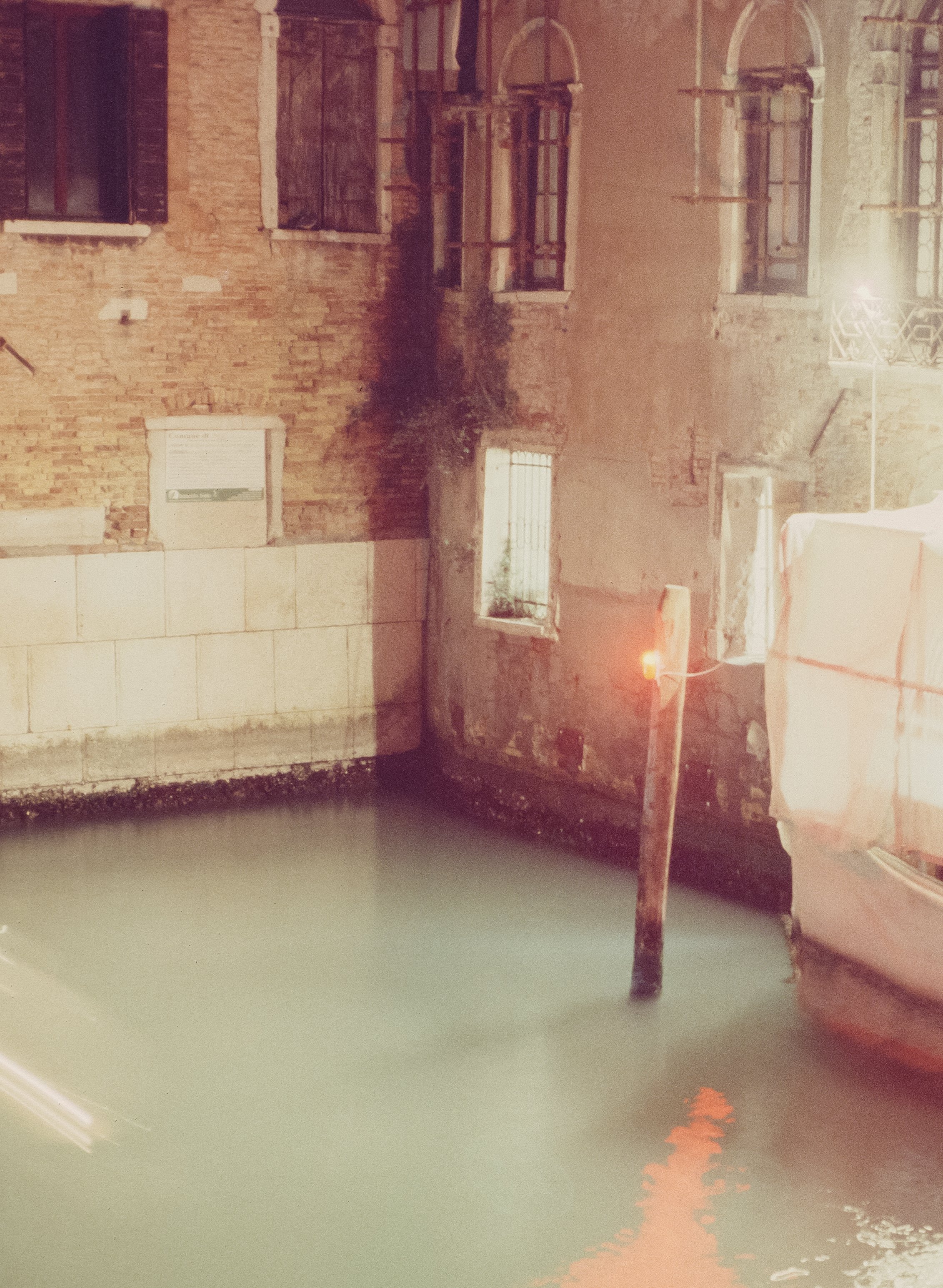


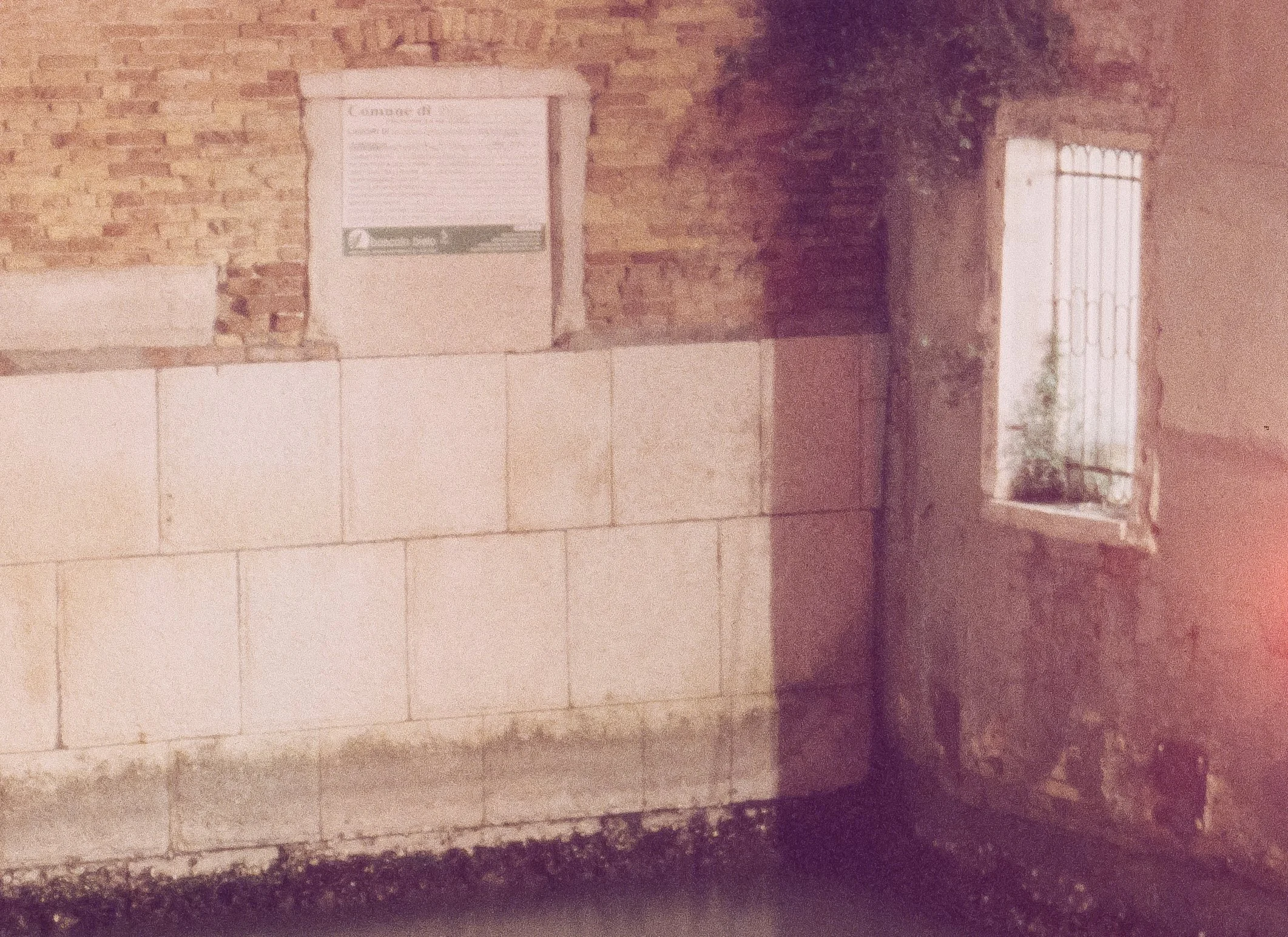
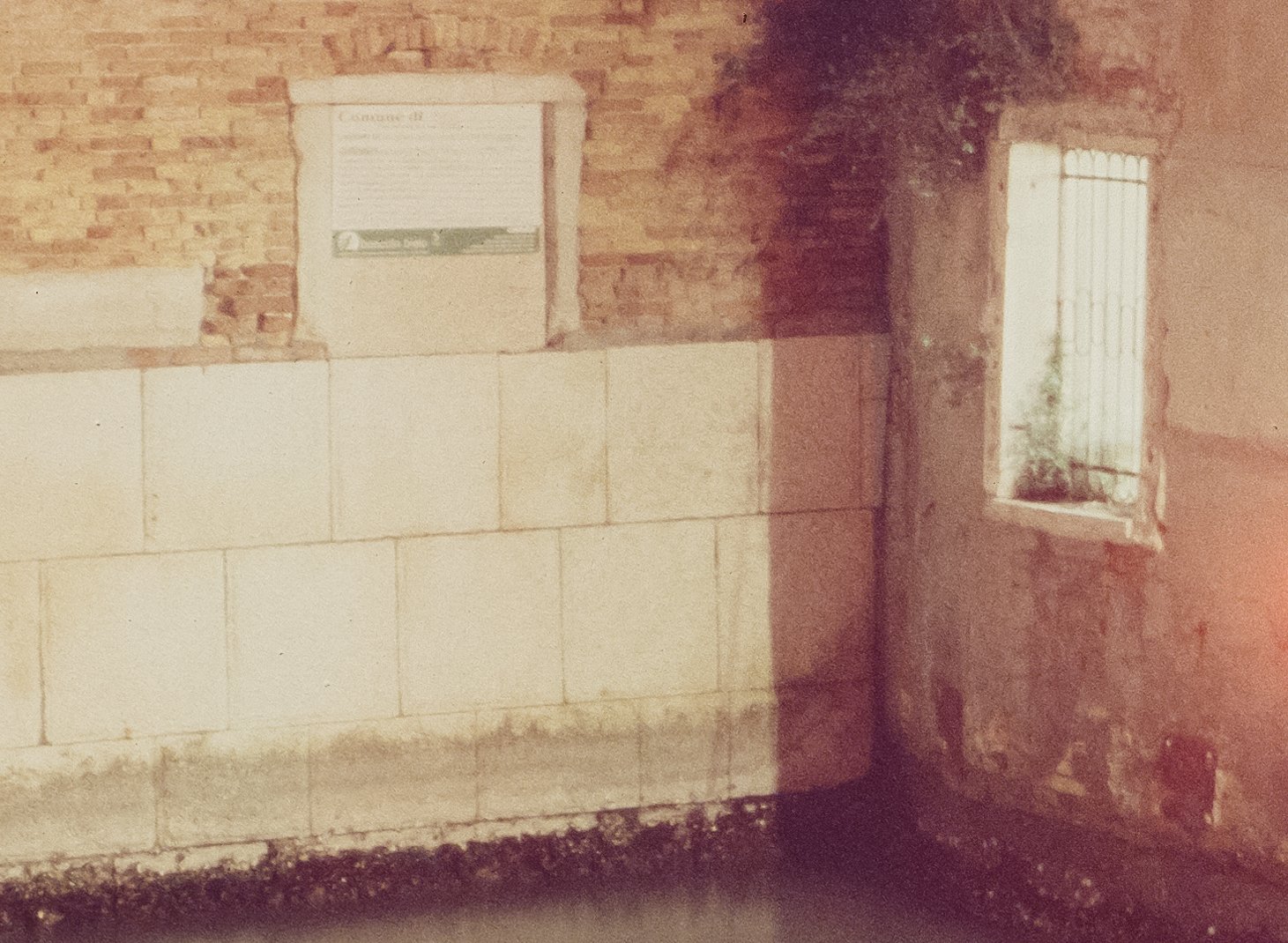




Flextight X5 vs. Noritsu HS-1800: Color & Dynamic Range Comparison
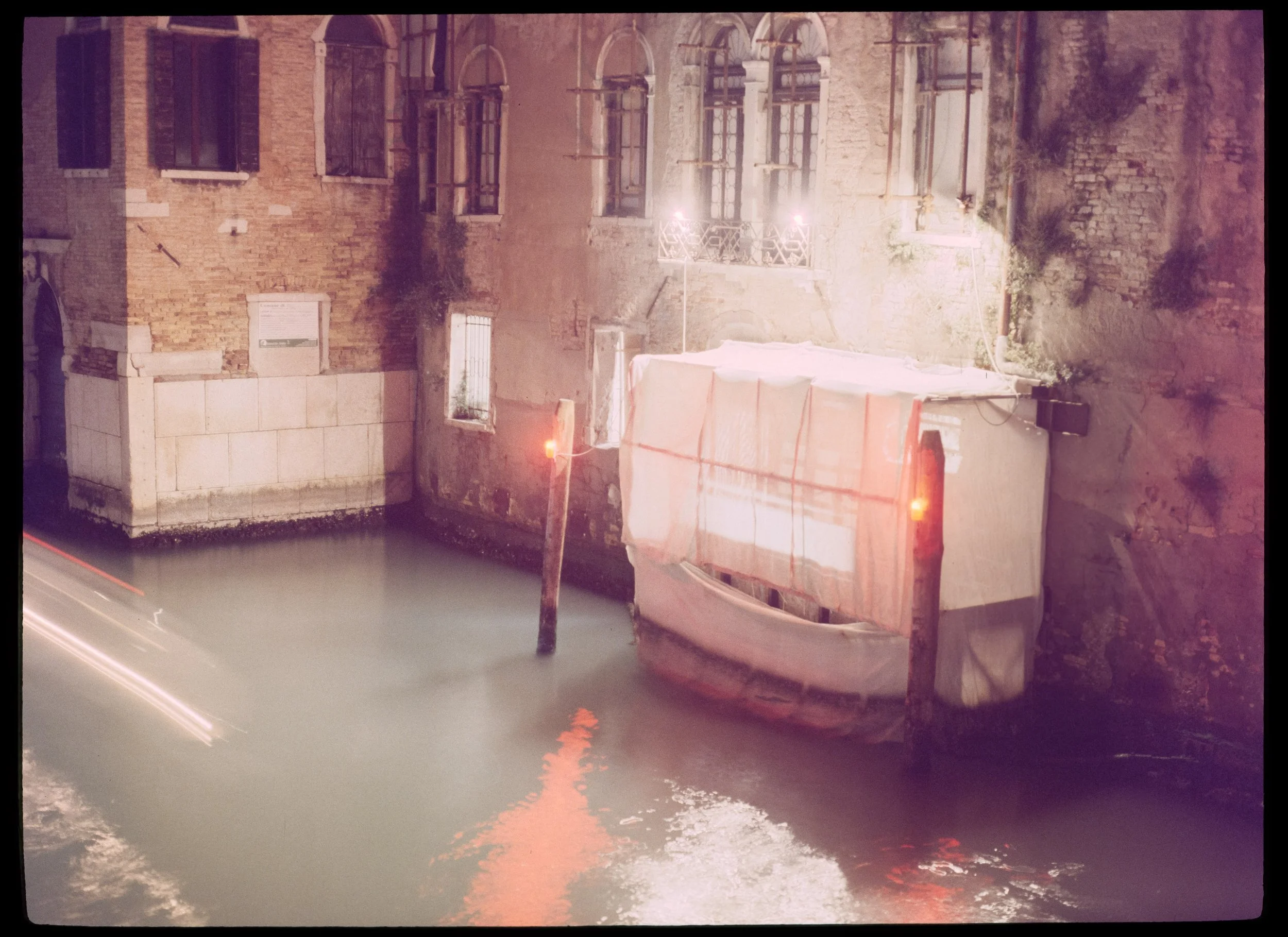
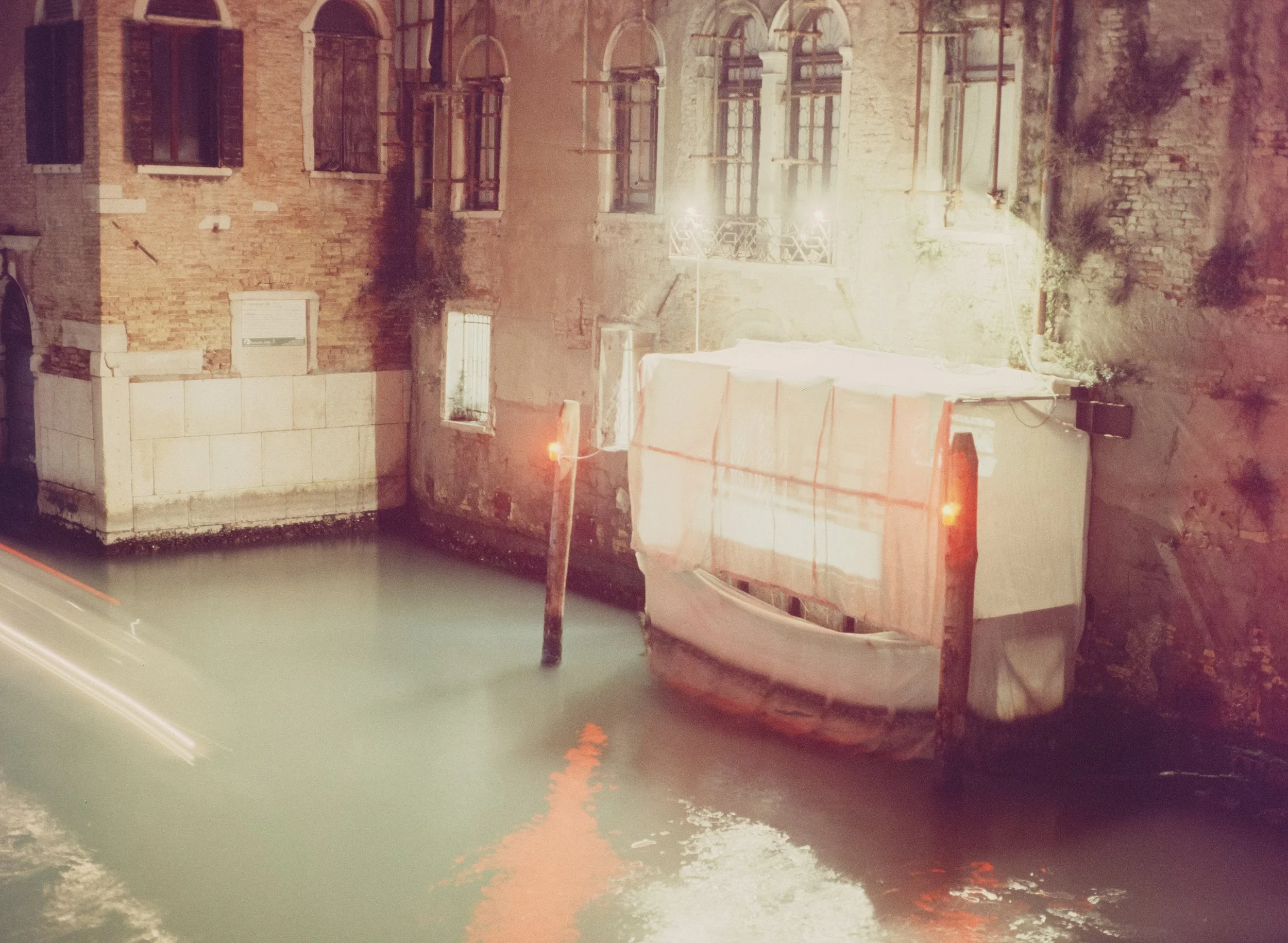
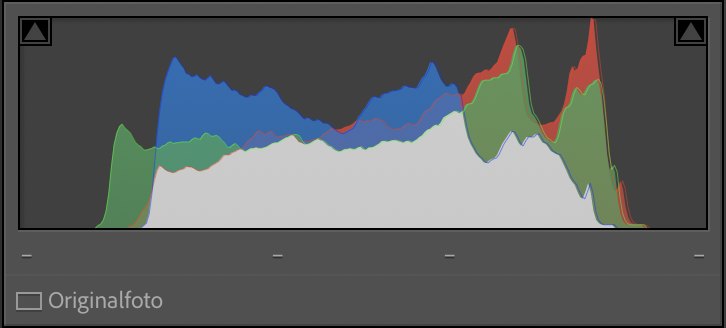
You’ll instantly notice that the Noritsu and the Flextight don’t just differ in sharpness and dynamic range—they differ in color too. I was quite surprised about that! Is it the machine? Or the person behind it? The truth is: It’s both. While the Flextight’s optics and 16-bit depth provide a more 'true-to-life' color rendition of the actual slide, every scan is an interpretation as both are operated by a human being. Another benefit is that the 16 bit are a dream for editing! Even though i never felt that the 8 bit jpegs of the Noritsu were not sufficient.
But there’s more to it
The Hasselblad Flextight shows more saturated, "deeper" colors. Look at the red reflections in the water and the texture of the brick walls. It could be due to its impressive dynamic range. Instead of artificially brightening the scene, it squeezes every bit of information out of your slide.
The Noritsu scan is noticeably brighter and has a "washed-out" or flatter look. Either the software profile or the operator has intentionally lifted the shadows to ensure you don’t lose any information in the dark areas. While the facades might look a bit "milky" compared to the Flextight.
Take a close look at the lamps above the balcony. In the Flextight scan, the light is precisely contained and rendered with sharp edges. In the Noritsu scan, the bright areas tend to "bloom" or bleed into each other slightly.
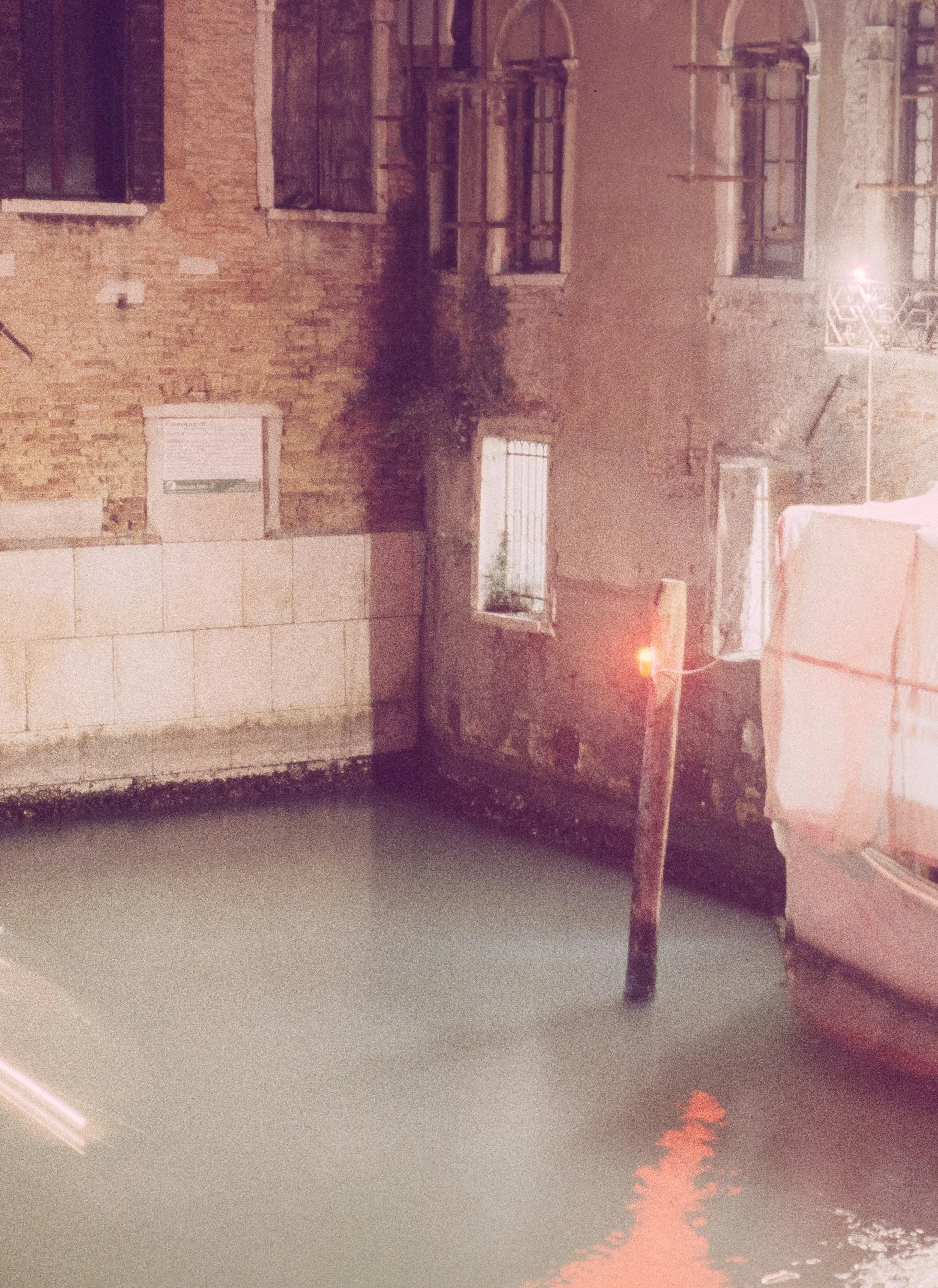
Zoomed in on a small sign on the brickwork. The Flextight just seems sharper overall. I also applied some sharpening to the final two frames, just to see how the files would take it.
Bottom Line: Is the Flextight worth it?
To be honest, looking at the results, the difference wasn't as "mind-blowing" as some internet forums might lead you to believe.
It’s impressive to see that the Flextight was able to pull out even more info than the Noritsu already did—especially in those dense Venice shadows—but it also makes you appreciate the Noritsu even more. At first glance, the Noritsu is surprisingly close to the high-end Hasselblad. It really solidifies the Noritsu HS-1800 as the "standard" for a reason. This all changes if you want to print big as following chart shows.
With a native resolution of 7311 x 5321 pixels at 3200 DPI, a single 6x4.5 frame from the Flextight gives you roughly 39 Megapixels of clean, Rodenstock-sharp data. For my Venice prints, this means I can print at A2 size with 300 DPI without any upscaling – something the Noritsu simply can’t reach.
Best Scanner for Large Prints? Max Print Sizes for 6x4.5 Medium Format
| Print Quality | DPI | Hasselblad X5 (39 MP) | Noritsu (17 MP) |
|---|---|---|---|
| High-End (Gallery) | 300 DPI | 61.9 x 45.1 cm (A2) | 40.6 x 29.8 cm (A3) |
| Very Good | 240 DPI | 77.4 x 56.3 cm | 50.8 x 37.2 cm |
| Good (Poster) | 150 DPI | 123.8 x 90.1 cm | 81.3 x 59.5 cm |
| Native Resolution | Pixel | 7311 x 5321 px | 4800 x 3515 px |
The numbers don't lie: While the Noritsu is a fantastic for daily shooting, the Hasselblad X5 delivers more than double the megapixels (39 MP vs. 17 MP) and a significantly higher Dmax of 4.9, which is crucial for recovering detail from the dense shadows of expired Ektachrome.
Urban Film Lab Review: Why I Trust One Lab with My Projects
While there are other high-end services in Germany—there’s a specific reason I stick with Urban Film Lab for my entire work.
The "Auto-Scan" Trap
Many large-scale archiving providers offer different tiers, often distinguishing between "Auto-Scan" and "Manual-Scan." If you’re paying for a Flextight X5, an Auto-Scan makes zero sense. You choose the Flextight because you want absolute, manual control over the histogram, the black points, and the legendary sharpness of the Rodenstock optics. In short, i want Tobias Urban, who treats every frame like a piece of art, not as a number in a queue.
Everything in One House: From Kodak Gold to Flextight
The biggest advantage for me is having everything in one hand. Whether I’m sending in the 20 rolls of Kodak Gold 200 from our summer holidays for standard 35mm Noritsu scans, or my Ektachrome Venice slides for the Flextight X5:
Consistency: I know exactly how Tobias handles the chemistry and the scanners.
Reliability: In all the years I’ve been sending my work here, I’ve never received the wrong scans and not a single negative has ever been lost. That is priceless.
Peace of Mind: Knowing that the person developing your film is the same one doing the high-end scan ensures that the vision remains consistent from the darkroom to the digital file.
How to Order Hasselblad Flextight Scans at Urban Film Lab
Having worked with other labs, I love the process Tobias and his wife have built. Here is how you get your film onto their Flextight X5:
Visit the Store: Go to the Urban Film Lab Store and navigate to the Scans section.
Select Flextight: Choose the Flextight option. You’ll find all typical film formats (35mm, 120 Medium Format up to 6x17, and 4x5 Large Format).
Choose TIFF (Crucial!): Make sure to select TIFF as your output format.
Note: While the Flextight produces a raw .3f file, this format requires Hasselblad’s dedicated FlexColor software, which only runs on older systems. By choosing TIFF, you get a massive 16-bit file that is ready for Lightroom or Photoshop while preserving all the dynamic range.
Send your Film: Complete the checkout. There’s no need to print out extra PDFs or fill out complicated forms. Just send your film via post with your order number.
The Scan: Once your film arrives, Tobias handles the rest. After the job is done, you’ll receive a download link (and your negatives back via mail). Easy!
High-End Film Scanning: FAQ
Is a drum scan better than a Noritsu scan? A virtual drum scan (Flextight) offers higher dynamic range (Dmax) and better edge-to-edge sharpness for large prints. However, for social media and standard prints, the Noritsu HS-1800 is faster and more cost-effective.
What is Dmax in film scanning? Dmax measures the scanner's ability to record detail in the densest parts of the film (shadows in negatives, highlights in slides). The Flextight X5’s Dmax of 4.9 is among the highest in the industry.
Should I get 16-bit or 8-bit TIFF scans? For professional work and color grading, 16-bit TIFFs are great as they provide millions of more color gradations, preventing "banding" during post-processing.
Where to get Hasselblad Flextight Scans in Europe (UK, Spain, Italy & Portugal)
While Urban Film Lab is my top choice, I know not everyone is living in Germany or wants to ship precious negatives all over Europe. If you are looking for that legendary Hasselblad Flextight X5 quality closer to home, these are the most prestigious labs offering dedicated high-end scanning services:
Southern Europe (Italy)
| Country | Lab Name | Location | Link |
|---|---|---|---|
| Italy | Yes We Scan | Milan | Visit Lab |
| Italy | Soluzioni Arte | Rome | Visit Lab |
Western Europe & UK
| Country | Lab Name | Location | Link |
|---|---|---|---|
| France | Emulsion Lab | Paris | Visit Lab |
| UK | Lucid Imaging | Cardiff | Visit Lab |
| UK | Rapid Eye | London | Visit Lab |
My Personal Takeaway
The Noritsu will remain the go to for my work. It’s fast, reliable, and the quality is fantastic for everything I do. Also its files are not gigantic in size.
However, for your absolute best shots, your bangers, or your own large print/gallery projects, the Hasselblad tier at Urban Film Lab is the perfect safety net to ensure you've captured every single grain of detail. I will absolutely continue to get re-scans on the Flextight. So its not either or. It’s both. And to answer the question; Is the Flextight X5 worth it? Yes. It is.
Final Verdict: Is the Flextight X5 better than the Noritsu?
If your goal is maximum detail for gallery-grade prints or recovering shadows from dense slides (like expired Ektachrome), the Hasselblad Flextight X5 is the best film scanner for medium format.
However, for daily shooting and high-volume projects, the Noritsu HS-1800 offers the best balance of quality and price. For my Venice book, I’ll be using both: Noritsu for the edit, and Flextight for the final "bangers."
Full Disclosure: I am not affiliated with any of the labs mentioned above (except for being a very happy long-term customer of Urban Film Lab). I don't receive commissions or free scans for these mentions. My goal is simply to provide a reliable map for the analog community to ensure your best frames get the scan quality they deserve.
Enjoyed this? You might also like:
If you found this article helpful, check out my other deep dives into the world of expired emulsions and color recovery:
Forget the Mju-II: Why the Olympus AF-1 is the Best Point & Shoot Under $100
FPP Retrochrome 400 Review: Shooting High-Speed Surplus Slide Film
Nikon F2 Review (2026): Is This the Best Mechanical 35mm Camera?
Nikon F Review (2026): Shooting the Indestructible 35mm Legend
422 Meters of Frozen Gold: The Expired Ektachrome Heist Part I
422 Meters of Frozen Gold: The Expired Ektachrome Heist Part II
Embrace the Blues: Why Ektachrome shifts cooler and how to handle it
Minolta SR-101 (SRT 101) Review: The Ultimate Mechanical SLR in 2026?